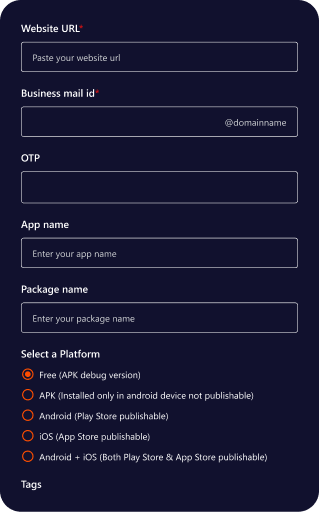
Prerequisites for Quikapp
Website URL
This is the website address that QuikApp will load inside the mobile app.
Why It’s Required
- QuikApp works by wrapping your website inside a mobile app using a WebView / hybrid approach.
- Without a valid website URL, the app will have no content to display.
What You Must Provide
- A live and publicly accessible URL
- The website must be mobile responsive
- The URL must start with:
- https:// (recommended)
- http:// (less secure and sometimes restricted)
Example
- https://www.example.com
Important Rules
- The URL must be verified before proceeding.
- Private, localhost, staging, or blocked URLs will fail validation.
Domain Verification
Why it’s required
- Prevents:
- Fake apps
- Brand misuse
- Unauthorized app creation
Ensures only the domain owner can create apps for that website.
App Icon and Splash Screen
Controls the visual branding of your mobile app.
App Icon
- Google Play Store
- Apple App Store
- App launcher icon on devices
- Square image
- High resolution (e.g., 1024×1024)
- Transparent or solid background
- The screen shown while the app is loading.
- Appears before website content loads.
- Improves user experience
- Prevents blank/white screen on startup Reinforces brand identity
- The app opens the website Home page directly.
- The app may look unprofessional.
Android and iOS Keystore Values
Android Keystore
- Keystore file (.jks)
- Keystore password
- Key alias
- Key password
- Google Play will not accept unsigned apps
- Same keystore is needed for all future updates
iOS Certificates & Provisioning
- iOS Distribution Certificate
- Provisioning Profile
- App ID (Bundle Identifier)
- Apple requires strict signing for:
- App Store builds
- TestFlight
- Production apps
- Android build fails
- iOS build fails
- App store upload rejected
Firebase
To enable Push Notifications, Google Analytics, Google Admob, Google Signin, the Firebase Admin SDK service key file is required.
What it Enables
Allows the app to send push notifications to users in real time.
Allows the app to integrate Admob and Analytics.
- New offers & promotions
- Order status updates
- Important announcements
- User engagement & reminder notifications
Firebase Configuration (Required)
- google-services.json
- GoogleService-Info.plist
- APNs Authentication Key
- Key ID
- Team ID
- Firebase Admin SDK service account key.
- Eg: my-firebase-project-12345-firebase-adminsdk-abcde-67890.json
- Reliable delivery
- Highly scalable
- Works seamlessly on both Android & iOS
- Free for most standard use cases
- The App’s functionality will remain the same.
- Push notifications will not work.
Developer Accounts
To publish your mobile apps created with QuikApp to Play store and Appstore, you must have active developer accounts with Google and Apple. Below are the prerequisites and account requirements based on the documentation.
1. Google Play Console (Android)
To publish your Android app (APK or AAB), you need a Google Play Developer account.
Account Requirements
- Google Account: A valid Gmail or Google Workspace account is required to sign up.
- Developer Registration: You must register at the Google Play Console.
- One-Time Fee: Google charges a one-time registration fee (currently $25) to create a developer account.
- Verification: You must complete identity verification as required by Google to prevent brand misuse.
2. Apple Developer Program (iOS)
To publish your iOS app (IPA) or use TestFlight for testing, you must be enrolled in the Apple Developer Program.
Account Requirements
- Apple ID: A valid Apple ID is required.
- Annual Enrollment: Unlike Google, Apple requires a paid annual subscription (currently $99/year).
- Team ID: You must be able to locate your 10-character alphanumeric Team ID in your account membership details.