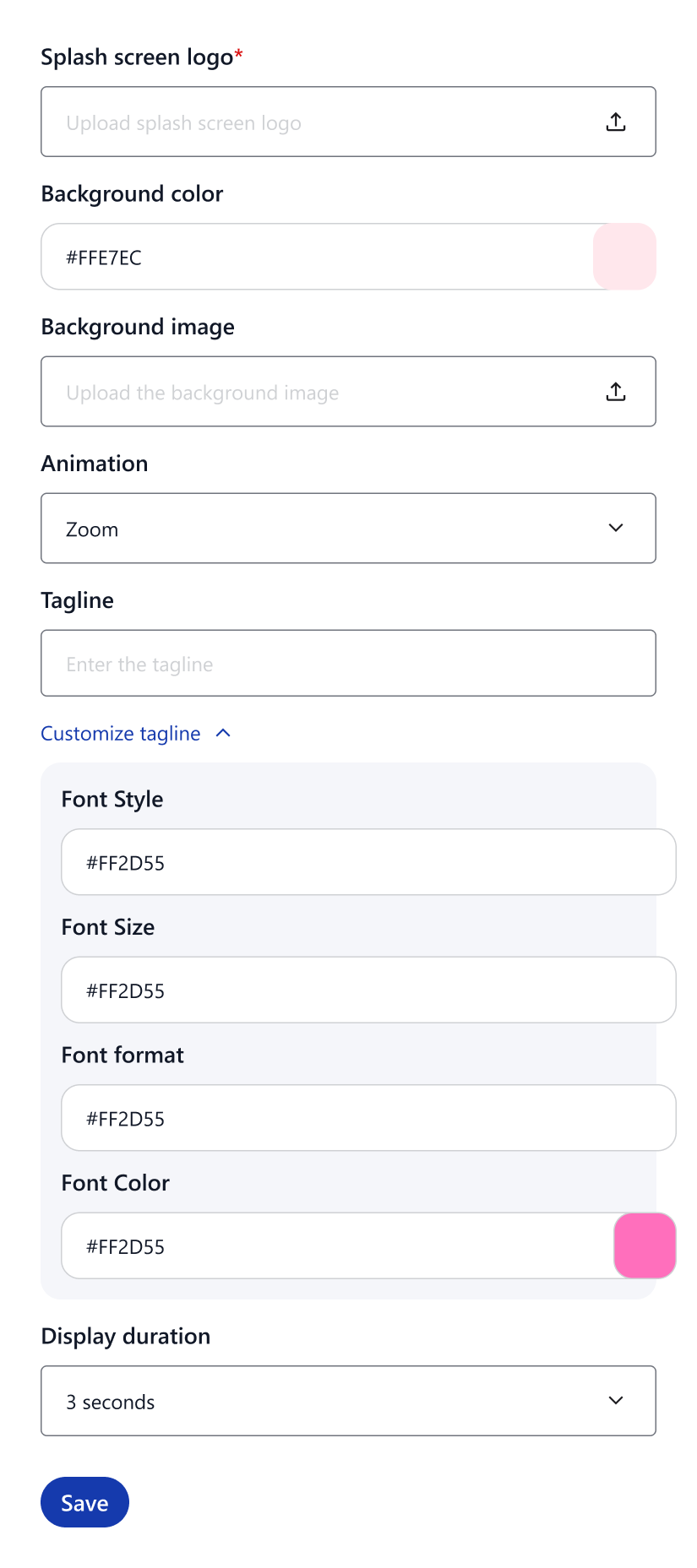
Splash Screen
The Splash Screen is the first screen users see when launching the app.
As shown in the image, QuikApp allows you to fully customize this screen to create a strong first impression and match your brand identity.
What Is the Splash Screen?
- The screen displayed while the app is loading
- Appears before the website or main app content loads
Why It’s Important
Improves user experience
Provides a smooth and polished app launch experience.
Prevents blank or white screens
Keeps users engaged while the app initializes.
Reinforces brand identity
Showcases your logo, colors, and brand message from the first moment.
Customization Options
Logo Settings
- Splash Screen Logo
Upload your brand logo to be displayed on launch. - Logo Size
Choose from Small, Medium, or Large.
Animation
- Animation Type
Select how the logo appears (e.g., Fade, Zoom, Slide, Rotate, None).
Background
- Background Color
Set a solid background color. - Background Image
Upload a custom background image (optional).
Tagline / Text
- Tagline
Add a welcome message or brand tagline (e.g., “Welcome Message”). - Font Style
Choose the font family for the text. - Font Color
Set the text color. - Font Size
Adjust the text size. - Font Format
Apply Bold or Italic styling.
Display Duration
- Display Duration
Control how long the splash screen is shown (e.g., 1–5 seconds).
How to Customize the Splash Screen
- Go to Customization → Splash Screen
- Upload your logo and optional background image
- Set logo size and animation
- Add a tagline or welcome text (optional)
- Choose display duration
- Save and preview the app
If Not Provided
- The app will open directly to the website home page
- The app may appear less polished or unbranded on launch